

1. Backup and Restore Method
This method can restore files that are permanently deleted on a laptop without using software and can be used for Windows 7, 8, 10 and 11. But this method can only be used if you have the latest data backup in Windows backup.
You do this by clicking the Start menu with the Windows symbol, then selecting Control Panel. After that, select the System and Maintenance option and select Backup and Restore.
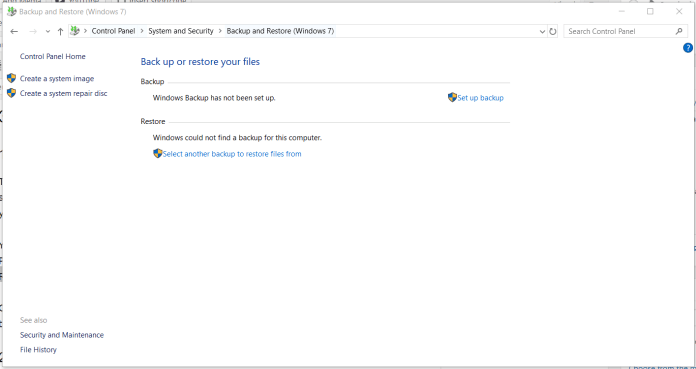
Click Restore my files and select Browse for files or Browse for folders to select the backup that was made previously. Then select the destination to save your file.
2. Restore Method Previous Versions
If you use a laptop with Windows 7, 8, 10 or 11, you can restore files that are permanently deleted by returning the previous version. But, make sure your File History feature is active before.
How to restore the file begins by searching for the folder where the file or folder has been permanently deleted. Right-click on the folder and select the Restore previous versions option.

You will see a list that contains various versions of files or folders. Select the latest version and click Restore to restore files that have been permanently deleted
3. Using the Application
The two methods above can be done without installing additional applications. But if for example you don’t have a backup or can’t do the method above, you can use an application like EaseUS Data Recovery Wizard or platforms such as Data Recover Lab to specifically recover files from all types of storage devices.
The trick, download and install the EaseUS Data Recovery Wizard application on your laptop or PC. After that, run the application as usual and select the location where your files are deleted.

Click the location and select the Scan option. This software will automatically scan the selected location and a few moments later the scan results will be displayed in the Deleted files section.
